6 min reading time
Architecting an Automated Customer Onboarding Engine

What You’ll Learn:
- The Infrastructure Audit: Identifying which manual tasks are killing your team’s velocity.
- The Data Connection: Mapping the automated flow between your CRM, your product, and your Customer Academy.
- The 48-Hour “Aha!” Moment: Using micro-milestones to drive immediate product adoption.
- Persona-Based Scaffolding: How to build persona-based onboarding and custom learning journeys for different users.
- The Flipped Classroom: Reclaiming your CSMs’ time for high-value strategic consulting.
If you’re in the SaaS world, you know this: the honeymoon phase is shorter than people might think. From the moment a contract is signed, the clock starts ticking on your customer’s Time-to-Value (TTV). Thoughtful time-to-value onboarding helps you accelerate that first win without overwhelming new users. If they haven’t found a reason to love your product within the first 30 days, they aren’t just a slow starter, but a churn statistic in the making.
You’ve likely felt the scaling trap yourself: When you had 20 customers, a 1:1 onboarding call for every new user was a badge of honor. You wanted to be there for every single one of them to showcase your appreciation! But now, with 500, 1,000 or even 5,000+ customers, that manual approach simply doesn’t work anymore. It’s expensive, it’s inconsistent, and honestly, it’s exhausting for your team.
The solution isn’t hiring more CSMs to do the same repetitive training because here’s the thing: you can’t hire your way out of a manual onboarding bottleneck. What you need is an automated customer onboarding engine: a scalable customer academy that turns questions into confidence.
Now that you know the way out, we’re here to help! Here is your blueprint for building that engine.
Phase 1: The Infrastructure Audit
First things first. Before you jump into automation, you must simplify what’s already there. Most onboarding processes are bloated with legacy friction, those tasks that exist only because “that’s how we’ve always done it.” We all know them.
So, the very first step is to audit your current customer journey. To do so, record every interaction a CSM has with a new client over one week. Take the time to do it, because it will be worth it in the end. You will likely find that a lot of their time, much more than you expected, is spent on basic tasks, such as:
- Resetting passwords or managing permissions.
- Explaining basic UI navigation.
- Sending “welcome” emails and PDF guides.
- Scheduling kickoff calls over email back-and-forth.
These are what we call manual traps. They exist because your customers have no easy way to find answers to even the simplest questions, so they’re forced to reach out to their CSM. In an automated customer onboarding engine, these tasks are outsourced to your Customer Academy. Sounds like a better plan, doesn’t it?
Your goal in Phase 1 is to identify the essential information your customer needs to get started. Anything that doesn’t directly contribute to a product win should be moved to an optional library rather than the core onboarding journey.
Phase 2: Connecting the Data
An automated engine is only as powerful as the data feeding it. To create a zero-friction experience, your Customer Academy must act as the connective tissue between different teams within your company.
1. The CRM-to-Academy Trigger
In a manual world, a CSM waits for a “contract signed” notification, then manually creates a user in the Customer Academy. In an automated engine, it all happens automatically.
- The trigger: A deal stage in your CRM, such as HubSpot, moves to “Closed/Won.”
- The action: The user profile is automatically created in the Customer Academy, and the customer is enrolled in the “Day 1” journey.
- The result: The customer receives their login credentials while they are still on the “thank you” page of your website. And you? Didn’t lift a finger.
2. Segmentation for Personalization
Not all users are created equal. Dropping a feature dump on every single customer is the fastest way to kill momentum and engagement. Here’s what you should do instead: use your CRM data to segment the learning journey.
- The admin journey: Focused on API keys, security settings, and team permissions.
- The end-user journey: Focused on the core workflows they need for their daily jobs.
- The executive journey: Focused on high-level reporting and ROI dashboards.
This supports persona-based onboarding without adding manual work. By automating these distinct tracks, you ensure your customer only sees what is relevant to them, and nothing else. No distractions. The result? An increase in completion rates.
Phase 3: Mapping the 48-Hour “Aha!” Moment
The goal of onboarding isn’t education. It’s adoption.
In the first 48 hours, a user needs to experience a moment where they realize: “This software is actually going to make my life easier.” For a CRM, the “Aha!” moment might be importing their first lead. For a Project Management tool, it’s creating their first task. You need to figure out yours. This alignment is the heart of effective time-to-value onboarding.
Your Customer Academy should act as a straight line to this moment. To do that, use in-app nudges that sync with your Customer Academy. For example, when a customer completes the “How to Import Data” module in your Academy, the product should immediately point them to the “Import” button with a celebratory prompt.
Phase 4: The Flipped Classroom Model
Different from what many people still believe, building a digital customer onboarding flow isn’t about replacing humans. In fact, it’s about elevating them!
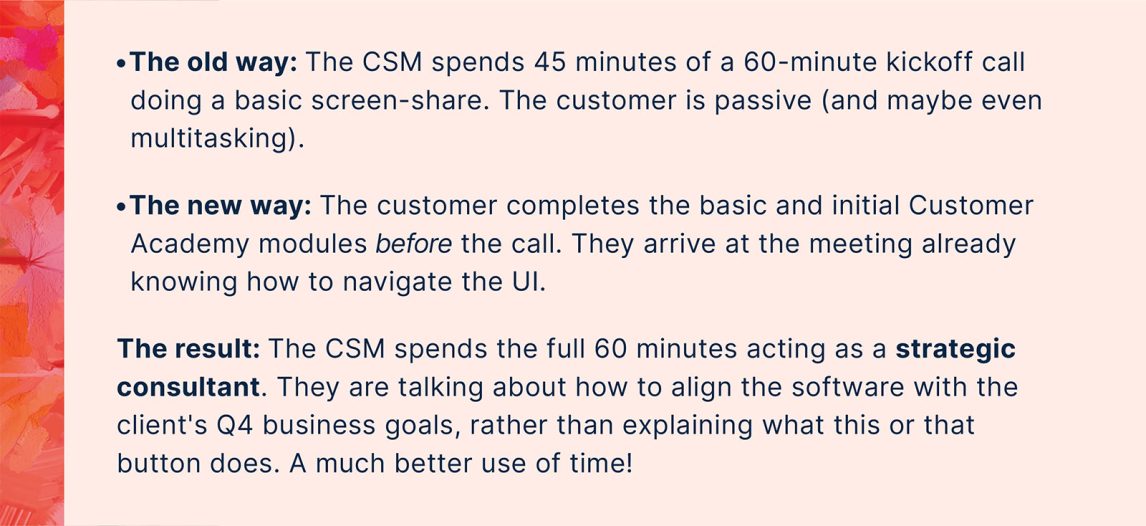
Just because you automate the basics doesn’t mean you eliminate the CSM. Instead, you adopt the flipped classroom approach.
The Invisible Safety Net: Proactive Intervention
Once your Customer Academy is up and running, you gain access to a goldmine of behavioral data. What does this mean? You can now see who is stalling before it becomes a support ticket. You’re being proactive, not reactive!
- The stalled customer: If a user hasn’t logged into the Customer Academy within 72 hours of the CRM trigger, the system sends an automated and personalized email from their assigned CSM, asking if they need any support from your team.
- The power user: If a customer completes the entire onboarding journey in 24 hours, the system alerts the Sales team of a potential expansion or advocacy opportunity. You’ve just identified a power user!
This is the right-touch customer onboarding. You don’t get the human element out of the equation—you use automation for the repetitive basics, so they can intervene exactly when and where they are needed most.
Trading Repetition for Relationships
Building an automated customer onboarding engine, more than a tool update, is a cultural shift. It requires moving away from the mindset where CSMs pride themselves on how many fires they put out, to an enablement powerhouse mindset.
Stop training for completion and start educating for growth. The engine you build today is the foundation for the scale you’ll achieve tomorrow. With a scalable customer academy, persona-based onboarding, and thoughtful time-to-value onboarding, your automated customer onboarding engine becomes a durable growth lever.
Q&A
Why move from manual onboarding to an automated customer onboarding engine?
Manual onboarding doesn’t scale—what worked at 20 customers collapses at 500+. It becomes expensive, inconsistent, and draining for your team, and you can’t hire your way out of that bottleneck. An automated engine, anchored by a Customer Academy, turns common questions into self-serve answers and shortens Time-to-Value so new users hit their first win quickly.
What should we look for during the Infrastructure Audit, and how do we streamline the core journey?
Record every CSM interaction with new customers for a week to expose “manual traps” like password resets, basic UI walk-throughs, welcome emails, and scheduling back-and-forth. Your goal is to isolate only the essentials needed to get a customer started. Everything that doesn’t directly drive an early product win should move to an optional library, not the core journey.
How do CRM-to-Academy triggers and segmentation create a personalized, zero-friction start?
When a CRM deal moves to Closed/Won, the Academy automatically creates the user, enrolls them in a Day 1 path, and sends credentials immediately—no CSM clicks required. Then, CRM data segments users into persona-based tracks: admin (security, API, permissions), end-user (daily workflows), and executive (reporting, ROI). This automation shows each user only what’s relevant, reducing distractions and boosting completion rates.
What is the 48-hour “Aha!” moment and how do we engineer it?
It’s the early point where users feel, “This will make my life easier”—like importing a first lead in a CRM or creating a first task in a PM tool. Design your Academy as a straight line to that moment using micro-milestones and synced in-app nudges. For example, after completing a “How to Import Data” module, the product immediately spotlights the Import action with a celebratory prompt to convert learning into action.
Are we replacing CSMs with automation? How do the flipped classroom and safety net change their role?
No, automation elevates CSMs. With a flipped classroom, customers learn basics in the Academy before the call, freeing the entire meeting for strategic consulting (e.g., aligning the product to Q4 goals). The Academy’s behavioral data powers a proactive safety net: stalled users get timely, personalized outreach, while power users trigger expansion or advocacy alerts. That’s right-touch onboarding—humans where they matter most.